
Key takeaways
- Joining is free for suppliers in every country and all 10 textile categories.
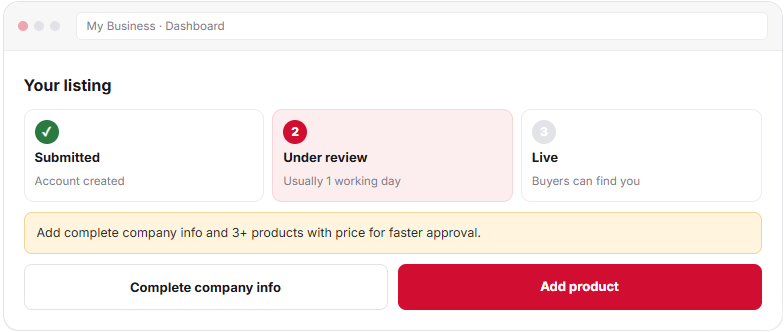
- Your listing moves from Submitted to Under review to Live .
- Complete company details plus 3 products with price get approved fastest.
- If something needs fixing, you see the reason in My Business. Fix it and resubmit.
- Buy leads open to you once your listing is Live.
How approval works
Listing approval is a short check by the Textilepages team before your company appears to buyers. It keeps the marketplace real and useful. Most complete listings are approved within one working day.
Submitted
Account created
Team checks your details
Live
Buyers can find you
Get inquiries
Messages reach your inbox
Quote leads
Buy leads open to you
Choose your account type
| Account type | Choose it if you | You can |
|---|---|---|
| Supplier | Make, export or trade textiles | List products, get inquiries, quote buy leads |
| Both | Sell and also buy yarn, trims, fabric or machinery | Everything a supplier can do, plus post buy requirements |
| Buyer | Only source products | Contact suppliers and post requirements |
Manufacturers, exporters, wholesalers, traders, buying houses and stock-lot sellers all join as suppliers. You can switch to Both later from your account settings.
Sign up step by step
- G o to Join Free Open Join Free and choose Supplier . Choose Both if you also buy materials.
- E nter your company and contact details Company name, country, your name, work email and phone with WhatsApp if you use it. Use the legal company name buyers will see on invoices.
- C onfirm your email Open the email from Textilepages and click the link. Your dashboard, My Business , opens.
- C omplete company information Business type, main categories, year established and a short overview. The dashboard shows what is still missing.
- A dd at least 3 products with price Each product needs a clear name, photos, price or price range and MOQ.
- S ubmit for review Your listing moves to Under review . The team checks it, usually within one working day.
Use a company email such as [email protected], not a free mailbox, and add your website if you have one. Reviewers can then match your company quickly.
What the review checks
| Area | What the team looks for |
|---|---|
| Company | A real business name, country and contact details that match |
| Category | Main categories that fit what you actually sell |
| Overview | A plain description of what you make or trade, without copied text |
| Products | Clear names, your own photos, price or range and MOQ |
| Contact | An email and phone that work |
The review is about listing quality. It is separate fromverification, which checks your business documents and gives you the Verified seal.
Listing status explained
| Status | What it means | What you do |
|---|---|---|
| Submitted | Your account exists but is not reviewed yet | Finish company info and products |
| Under review | The team is checking your listing | Wait, usually up to one working day |
| Changes needed | Something must be fixed first | Read the note, fix it, resubmit |
| Live | Buyers can find you in search | Reply to inquiries, quote buy leads |
If changes are needed
You see the reason in My Business. Fix the item and submit again. These are the common reasons:
Each new product goes through the same check. A product with changes needed does not affect your other live products.
After you go live
- Complete your profile:Build a company profile that wins buyers
- Show your production:Show your factory and capacity
- Earn the Verified seal:How to get Verified
- Reply fast:Reply to buyer inquiries
- Start quoting:Win buy leads with quotations
Frequently asked questions
How long does supplier listing approval take?
Most complete listings are approved within one working day. Listings with missing company details or products without price can take longer, because the team may ask you to add them first.
Is it free to list my company on Textilepages?
Yes. Suppliers in any country can join free, create a company profile and list products. Free plan limits change from time to time and are counted weekly. Premium plans add more.
Why do I need 3 products with price?
Buyers judge a supplier by its products. Three priced products show what you sell and at what level, so the team can approve you and buyers can contact you with real questions.
What happens if my listing needs changes?
You see a note in My Business that explains what to fix. Make the change and submit again. Your listing goes back to Under review.
Can I list more than one company?
Each company needs its own listing with its own details. If you run two businesses, create a separate account for each so buyers see the right information.
This guide explains how Textilepages works and common trade practice. It is general information, not legal, financial or customs advice.