
Key takeaways
- Verified means Textilepages has checked the supplier’s business documents .
- It is not a product-quality guarantee, a factory audit or a certificate check.
- Certificates are shown as suppliers provide them — Textilepages does not issue or verify them.
- Always confirm a certificate with the issuing body : number, scope, site and validity.
- Use Verified plus your own checks, samples and inspection.
What Verified means
Verified means the Textilepages team has checked a supplier’s business documents, such as a trade licence or company registration, and found they match the company listing. It confirms the business exists. It does not rate product quality.
Who can get Verified
Every supplier can apply. Verification is not a Premium feature. Manufacturers, exporters, traders, wholesalers and buying houses in any country can get the seal once their listing is Live.
Documents to upload
| Document | Examples by country | Tip |
|---|---|---|
| Trade or business licence | Trade licence (Bangladesh), GST certificate (India), business licence (China) | Must be valid today |
| Company registration | Certificate of incorporation, registry extract | Registration number visible |
| Tax or export registration | VAT, TIN, IEC, ERC or similar | Optional but helpful |
| Address proof | Utility bill or lease in the company name | If your licence shows another address |
Step by step
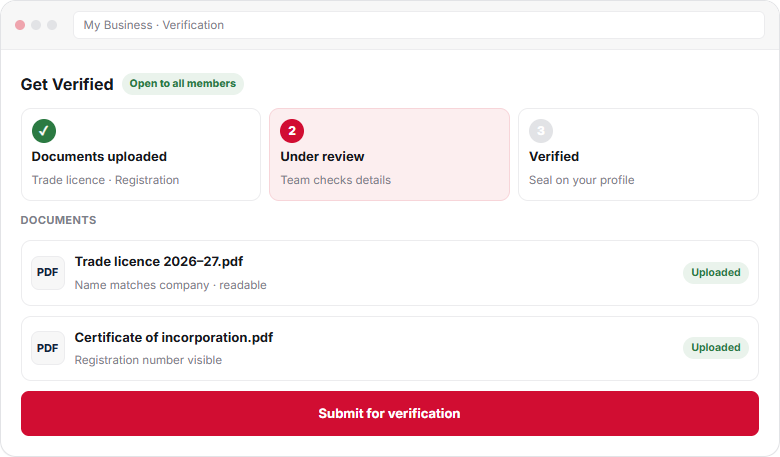
- Open VerificationIn My Business, openVerification. It is available on Free and Premium plans.
- Check your company detailsCompany name, address and country must match your documents exactly.
- Upload business documentsUpload clear scans or PDFs, such as a trade licence and a company registration certificate.
- Submit for reviewThe Textilepages team checks the documents against your listing.
- Get the Verified sealWhen approved, the ✓ Verified seal shows on your profile, products and search results.
What buyers see
A green ✓ Verified seal appears next to your company name on your profile, on your products and in search results. Buyers can filter search to show Verified suppliers only, so the seal also brings you into more searches. See how ranking works with plans.
Verified vs certificates
| Question | Verified seal | Certificates |
|---|---|---|
| What it is | Textilepages checked your business documents | Third-party standards such as GOTS or OEKO-TEX |
| Who issues it | Textilepages | The certification body |
| Who checks it | Textilepages team | Buyers confirm with the issuing body |
| Where to add | My Business → Verification | My Business → Certificates |
Textilepages shows certificates as you provide them and does not verify them. Read Add your certifications.
Common problems
Keep it current
Licences expire. When yours is renewed, upload the new copy so your seal stays active. If you change company name or address, update your listing and documents together.
Frequently asked questions
Is verification only for Premium members?
No. Verification is open to all suppliers on Free and Premium plans. Any supplier with a Live listing can upload business documents and apply for the Verified seal.
What documents do I need to get Verified?
A valid trade or business licence and a company registration document usually cover it. Tax or export registration and address proof help if your details differ between documents.
Does the Verified seal mean my certificates are checked?
No. The seal covers your business documents only. Certificates such as GOTS or OEKO-TEX are shown as you provide them, and buyers confirm them with the issuing body.
Why was my verification not approved?
The usual reasons are a name mismatch, an expired licence or an unreadable scan. You see the reason in My Business. Fix it and submit again.
Can buyers filter for Verified suppliers?
Yes. Buyers can filter search results to show Verified suppliers only, so the seal helps you appear in those searches.
This guide explains how Textilepages works and common trade practice. It is general information, not legal, financial or customs advice.