
Key takeaways
- A group is one page with a fixed link for related products.
- Each group is led by a key product.
- Name groups with words buyers search.
- Keep each group to one product type.
- Share the group link in replies and quotations.
What a product group is
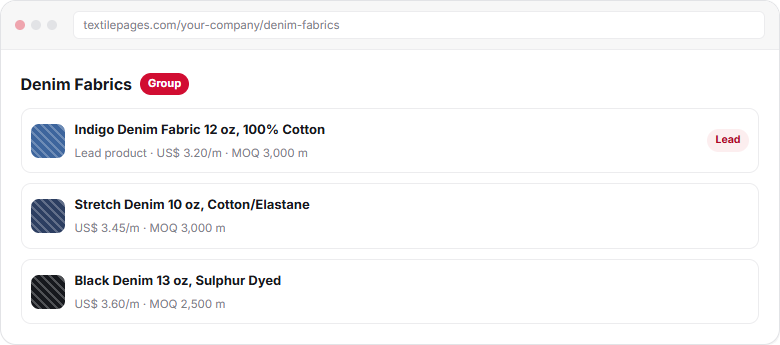
A product group is a page on your company profile that collects related products under one name, such as “Denim Fabrics”. It has a fixed link and is led by one key product.
When to group
| Group these | Keep separate |
|---|---|
| Denim in 10, 12 and 14 oz | Denim and terry towels |
| Terry towels in 4 sizes | Towels and bathrobes, if you sell many of each |
| Polo shirts in 3 fabrics | Polo shirts and woven shirts |
| Zippers in metal, nylon and plastic | Zippers and buttons, if each range is large |
One product type per group works best. A buyer who opens “Denim Fabrics” expects only denim.
Create a group
- Open Product groupsIn My Business → Products, openGroupsand click New group.
- Name the groupUse the product type buyers search, such as “Denim Fabrics” or “Terry Towels”.
- Choose the lead productPick your best-selling or most complete product to lead the group.
- Add productsAdd related products, or choose the group in step 7 when you add a product.
- Save and shareThe group gets a fixed link you can share with buyers.
Name your groups
- Use the plural product type: “Cotton Yarns”, “Fitted Sheets”.
- Add a key feature only if it splits your range: “Organic Cotton Yarns”.
- No company name or slogans in the group name.
- The fixed link is made from the name, so choose it carefully. Plain words, no codes.
Share the link
Add the group link to your email signature, quotations and replies. A buyer who asks for “towels” gets your full towel range in one click. Learn more in Reply to buyer inquiries.
Frequently asked questions
What is a product group on Textilepages?
It is a page on your company profile that collects related products under one name, with a fixed link. It is led by one key product that buyers see first.
How many products should a group have?
There is no strict number. A group works well with 3 or more related products of one type, such as denim in different weights.
Does the group link change when I add products?
No. The link is fixed, so you can share it with buyers and it keeps working as you add or remove products.
Which product should lead the group?
Choose your best-selling or most complete product, with good photos, specs and price. It sets the first impression of the whole range.
This guide explains how Textilepages works and common trade practice. It is general information, not legal, financial or customs advice.