
Key takeaways
- Add each certificate with number, issuer, valid-until date and scope.
- Certificates are shown as you provide them. Textilepages does not verify them.
- Buyers confirm certificates with the issuing body, so give the number.
- Certified suppliers appear on certified-supplier pages.
- Remove or renew a certificate when it expires.
Why certificates matter
Textile certificates are third-party proofs that a product, material or factory meets a standard, such as organic content, chemical safety or social compliance. Brands in Europe and North America often ask for them before they request a quote.
Common textile certificates
| Certificate | What it covers | Common in |
|---|---|---|
| GOTS | Organic fibre content and processing | Organic cotton fabric, apparel, home textiles |
| OEKO-TEX® Standard 100 | Tested for harmful substances | Fabric, yarn, garments, baby wear, bedding |
| GRS / RCS | Recycled content | Recycled polyester, cotton blends |
| OCS | Organic content tracking | Yarn and fabric |
| amfori BSCI, SMETA, WRAP, SA8000 | Social compliance audits | Garment and home textile factories |
| ISO 9001 / ISO 14001 | Quality and environmental management | All factories, machinery, chemicals |
| bluesign®, ZDHC | Chemical management | Dyes, chemicals, dye houses |
Add a certificate
- Open CertificatesIn My Business, openCertificatesand click Add certificate.
- Choose the standardPick it from the list, such as GOTS, OEKO-TEX Standard 100 or GRS.
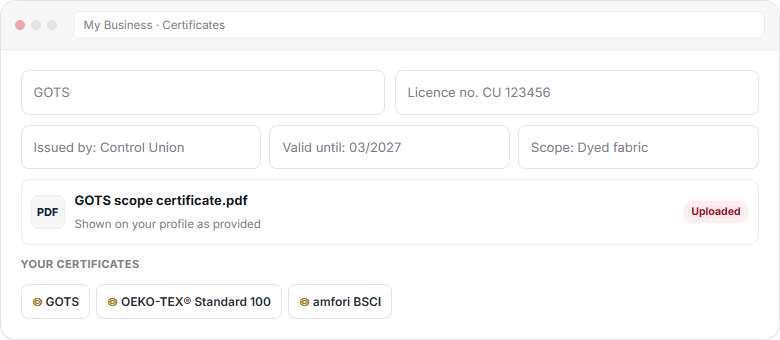
- Enter the detailsCertificate or licence number, issuing body, valid-until date and scope.
- Upload the certificateAdd the PDF or a clear scan of the current certificate.
- Link it to productsWhen you add or edit a product, tick the certificates that cover it.
Details buyers look for
- Number: the licence or certificate number buyers can check.
- Issuer: the certification body, such as Control Union, Intertek or ECOCERT.
- Valid until: the expiry date.
- Scope: which products, processes or sites the certificate covers.
- Copy: the current certificate as a PDF.
Certified-supplier pages
Suppliers who list a certificate also appear on the matching certified-supplier page, for example /certified-suppliers/gots. Buyers browse these pages when certification is a must.
Certificates on products
When you add a product, step 6 lets you tick the certificates that cover it. A GOTS licence for dyed fabric should not be ticked on a polyester product. Accurate links stop disputes later. See Add products that get inquiries.
Rules to follow
Frequently asked questions
Does Textilepages verify my certificates?
No. Textilepages shows certificates as suppliers provide them and does not verify or issue them. Add the certificate number and issuer so buyers can confirm it with the certification body.
Which certificates can I add?
You can add common textile standards such as GOTS, OEKO-TEX Standard 100, GRS, OCS, amfori BSCI, SMETA, WRAP, SA8000, ISO 9001 and ISO 14001, plus others relevant to your products.
How do I appear on certified-supplier pages?
Add the certificate to your profile with its details. Your company then appears on the matching certified-supplier page, such as the GOTS page.
What should I do when a certificate expires?
Upload the renewed certificate with the new valid-until date. If it is not renewed, remove it so buyers see only current certificates.
Can I link a certificate to specific products?
Yes. When you add or edit a product, tick the certificates that cover it. Only tick those whose scope includes that product.
This guide explains how Textilepages works and common trade practice. It is general information, not legal, financial or customs advice.