Key takeaways
- Name formula: material + type + key spec + feature.
- Up to 10 tags in plain words buyers type.
- Up to 8 of your own photos with a plain background.
- Give a price or range. “On request” gets fewer inquiries.
- Tick options: Samples, Free samples, Custom colours / OEM, Ready stock, Stock lot.
Why each product matters
A product listing is a page for one item you sell, with name, photos, specs, price and terms. Buyers search products more than companies, so every good product is another way in to your business.
The 7 steps
- Category Choose the most exact category and sub-category, such as Fabric → Denim.
- Basics Write the product name and up to 10 tags buyers search.
- Photos Upload up to 8 of your own photos: front, back, close-up and packed.
- Specs Fill in the fields for your category, such as GSM, width or yarn count.
- Price & terms Fixed price, range or on request, plus MOQ, lead time, trade terms and options.
- CertificatesTick the certificates that cover this product.
- Group
Optionally add it to a product group, then submit for review.
Write a good name
“Best Quality Fabric New Design Hot Sale”
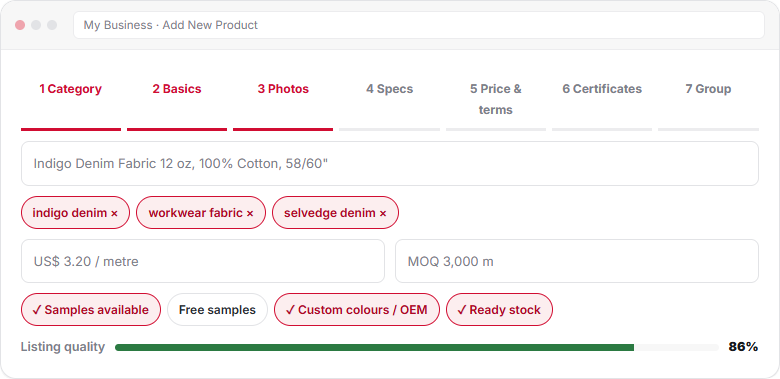
No material, no spec. Buyers do not search like this.“Indigo Denim Fabric 12 oz, 100% Cotton, 58/60 inch”
Material, type, weight and width in plain words.- Keep it under about 70 characters.
- No supplier name, phone or price in the name.
- One product per listing. Different weights or blends can share a group instead.
Tags
Add up to 10 tags. Use the words buyers type, such as “workwear fabric” or “selvedge denim”. Plain text only, no hashtags or codes. Do not add tags for things you do not sell.
Photos
- Up to 8 photos; the first is the main image.
- Your own photos with a plain, light background.
- Front, back, close-up of texture and the packed product.
- No watermarks from other sites and no text over the image.
- Square or wide, sharp and well lit.
Specs by category
The spec fields change with the category. Fill in every field you can. Buyers filter by these details.
| Category | Key specs to fill in |
|---|---|
| Fabric | Composition, weave or knit, GSM or oz, width in inches, finish, colours |
| Yarn | Count (Ne/Nm/denier), composition, ply, twist, end use |
| Apparel & Garments | Fabric, GSM, sizes, fit, print or embroidery, packing |
| Home Textiles | Size in inches, GSM or thread count, construction, packing |
| Fibre & Raw Textiles | Fibre type, staple length, micronaire or denier, grade |
| Garment Accessories | Material, size, finish, colour matching, MOQ per colour |
| Technical Textiles | Application, key test standard, weight, coating |
| Sustainable & eco textile | Certified material, recycled or organic share, certificate |
| Textile Dyes & Chemicals | Type, application, form, pack size, safety data sheet |
| Textile Machinery | Brand, model, new or used, year, capacity, power |
Price, MOQ and terms
| Field | Example | Tip |
|---|---|---|
| Price | US$ 3.20 per metre, or US$ 3.10–3.60 | A range gets more replies than “on request” |
| Unit | Metre, yard, kg, piece, set, ton | Use the unit buyers order in |
| MOQ | 3,000 metres | Per colour or per order; say which |
| Lead time | 35 days | From approved sample |
| Trade terms | FOB Chattogram, CIF | State the port |
| Payment | T/T, L/C at sight | As you accept |
Product options
| Option | Tick it when |
|---|---|
| Samples available | You can send samples, paid or free |
| Free samples | You send samples without charge; buyer may pay courier |
| Custom colours / OEM | You make to the buyer’s colour, design or label |
| Ready stock | You can ship now from stock |
| Stock lot | Surplus or overrun goods, also shown in the Stock lots category |
Read more in Sell stock lots, ready stock and low MOQ.
Listing quality
The listing quality score shows how complete a product is. It rises with a clear name, tags, photos, specs, price and MOQ. New products go through a short review, usually within one working day. Group related items next: Organise products into groups.
Frequently asked questions
How many photos can I add to a product?
You can add up to 8 photos. Use your own pictures with a plain background, and include front, back, a close-up and the packed product.
Should I show a price?
Yes, if you can. A fixed price or a range gets more inquiries than price on request. Buyers use it to judge if you fit their budget before they write.
How many tags can I add?
Up to 10 tags per product. Use plain words buyers search, such as “terry towel” or “combed cotton yarn”, and only for what the product really is.
Why was my product not approved?
The usual reasons are a duplicate listing, unclear or copied photos, a missing price or MOQ, or the wrong category. The note in My Business tells you what to fix.
What units should I use for fabric width?
Use inches for fabric width, such as 58/60 inch, as most textile buyers do. Use the selling unit buyers order in, such as metres, yards or kilograms.
This guide explains how Textilepages works and common trade practice. It is general information, not legal, financial or customs advice.