Key takeaways
- See profile and product views over 7, 30 or 90 days.
- Track the step from view to inquiry for each product.
- Top buyer countries show where interest comes from.
- Quick wins point to fixes such as products with views but no price.
- Check once a month and fix the top 3 issues.
What analytics show
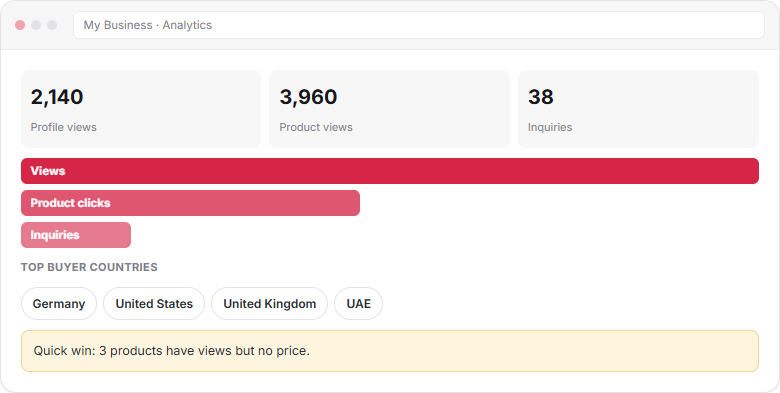
Supplier analytics are the numbers behind your listing: how many buyers saw your profile and products, how they found you, where they are and how many sent an inquiry.
Metrics explained
| Metric | What it counts | Use it to |
|---|---|---|
| Profile views | Visits to your company page | Judge how visible your company is |
| Product views | Visits to your product pages | Find your strongest products |
| Product clicks | Clicks from search to a product | Test names and main photos |
| Inquiries | Messages from buyers | Measure real interest |
| Reply time | How fast you answer | Keep under 24 hours |
| Top buyer countries | Where viewers are | Plan markets, prices and samples |
| How buyers find you | Search, category pages or Google | See which channels work |
From view to inquiry
Many views but few inquiries means buyers look and leave. The usual causes are a missing price, weak photos or unclear specs. Few views means buyers do not find you: check names, tags and categories.
| You see | Likely cause | Fix |
|---|---|---|
| Low views | Weak names or tags, wrong category | Rewrite names, add tags; see Add products |
| Views, no clicks | Main photo or name unclear | Change the first photo, sharpen the name |
| Clicks, no inquiries | No price, MOQ or specs | Add price range, MOQ and all specs |
| Inquiries, no orders | Slow or vague replies | Reply within 24 hours with full terms |
Top buyer countries
If most viewers come from Germany and the UK, show EU-relevant certificates, quote CIF to European ports and reply in their working hours. Match your offer to where interest really is.
Quick wins
The dashboard lists quick fixes, for example “3 products have views but no price”. Each one is a small change with a direct effect on inquiries. Start there.
A monthly routine
-
Check 30-day views
Compare with last month. - Find your top 5 products
Add more photos and specs to them; group related items. - Fix 3 weak products Use the funnel table above.
- Review reply time Aim for under 24 hours.
- Check buyer countries Adjust certificates, terms and samples.
Frequently asked questions
What do profile views mean?
Profile views count visits to your company page on Textilepages. They show how visible your company is in search, category pages and Google.
Why do I get views but no inquiries?
Usually buyers cannot see what they need to decide: price, MOQ, specs or clear photos. Add those first, then watch the view-to-inquiry step improve.
Which time periods can I see?
You can view your analytics over the last 7, 30 or 90 days, so you can compare short-term changes with longer trends.
How do top buyer countries help me?
They show where interest comes from. Use them to choose certificates, trade terms and sample plans that suit those markets.
This guide explains how Textilepages works and common trade practice. It is general information, not legal, financial or customs advice.