Key takeaways
- Choose alerts by email, WhatsApp or browser, and set quiet hours.
- Use a company email you will keep.
- Reset a forgotten password from the login page.
- See your plan, renewal date and invoices under Membership.
- Never share your password; Textilepages will not ask for it.
Where to find settings
Account settings are in My Business. They cover notifications, login and password, account type and contacts, and your membership with invoices.
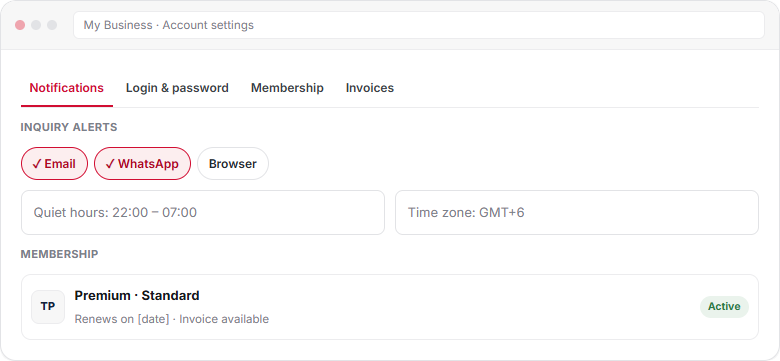
Notifications
| Alert | Channels | Tip |
|---|---|---|
| New inquiry | Email, WhatsApp, browser | Turn on WhatsApp for fast replies |
| No reply after 24 hours | Keep it on | |
| Trade Alert leads | Email, WhatsApp | Use 3 to 5 clear keywords |
| Listing and product review | Know when you go Live |
Set quiet hours and your time zone so alerts wait until your working day.
Login and password
- Log in at Log in with your email and password.
- Forgot it? Use Forgot password to get a reset link.
- Change your password from Login & password in settings.
- Use a company email such as [email protected], so the account stays with the company.
Account type and contacts
Switch between Supplier and Both if you also want to buy. Keep the phone, WhatsApp and contact person on your profile up to date; buyers use them. Edit company details in your company profile.
Membership and invoices
| Task | Where |
|---|---|
| See your plan and renewal date | Account settings → Membership |
| Upgrade from Free or change plan | Pricing |
| Download invoices | Account settings → Invoices |
| Help with payment | Support or your local agent |
Compare plans in Premium membership.
Keep your account safe
- Use a strong password you do not use elsewhere.
- Never share it; Textilepages staff will never ask for it.
- Log in only at textilepages.com, never through a link in a message.
- Update the login email when staff leave.
- Read Trade safely as a supplier.
To close your account or move it to a new owner, contact support.
Frequently asked questions
How do I change my inquiry notifications?
Open account settings in My Business and choose email, WhatsApp or browser alerts for each type. You can also set quiet hours and your time zone.
I forgot my password. What do I do?
Use Forgot password on the login page. Enter your account email and follow the reset link sent to you.
Where can I download my Premium invoices?
Invoices are in account settings under Invoices. You can also see your plan and renewal date under Membership.
Can I change from Supplier to Both?
Yes. Change your account type in settings to Both if you also want to post buy requirements and receive quotations.
How do I close my account?
Contact Textilepages support from the contact page. The team will help you close the account or move it to a new owner.
This guide explains how Textilepages works and common trade practice. It is general information, not legal, financial or customs advice.